Everything your travel baseball or softball club runs, in one place.
Tryouts, rosters, dues, documents, schedules, team chat and board records, in one place your volunteers will actually use.
14 days free, everything included. No card needed to start. Cancel any time, and your first payment is refundable for 30 days.
Dues go straight to your club’s own Stripe account. BallparkOS never takes a cut.
- 12U practice moved to 6:3034 families told by alert
- Fall tryout registration41 signed up, waivers signed
- Dues reminders3 families past due, reminded
- Birth certificates2 waiting for your approval
- Board meeting minutesDrafted, ready to approve
Handled without a single group text.
Retire the spreadsheets, the group texts, the Venmo reminders and the three-ring binder.
For the club office
Everything the director, treasurer and secretary juggle, in one place.
- Tryouts
- Online registration with signed waivers, phone check-in, coaches grade from the field, ranked results.
- Invitations and contracts
- Offer a roster spot; the family signs your player contract and picks a payment plan in one link.
- Dues and payments
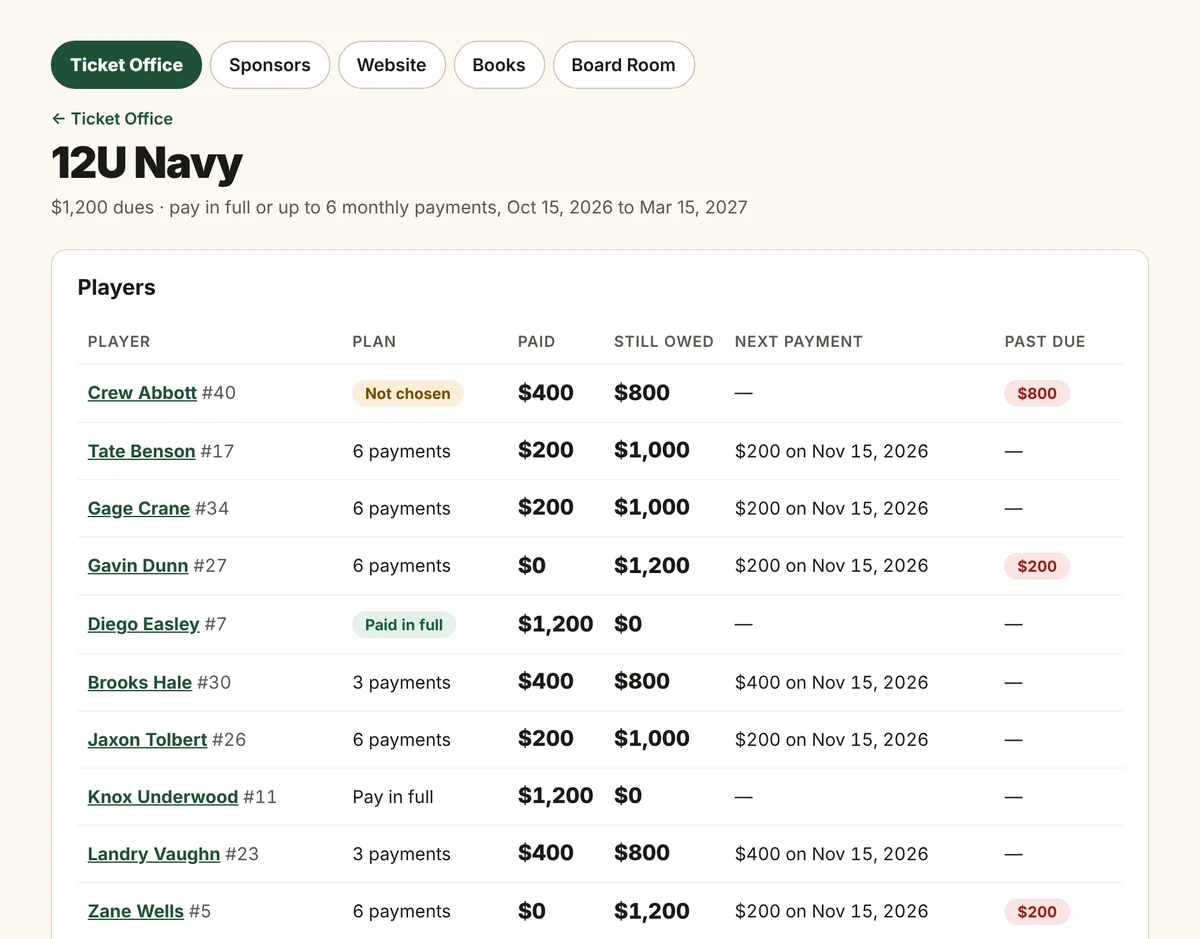
- Team dues, payment plans, scholarships and online card or bank payments to your own Stripe account.
- Books
- Income and expenses that post themselves, receipts from coaches’ phones (snap a photo and Blue fills it in), your bank connected to sort every charge, and a year-end package for your accountant.
- Board Room
- Agendas, minutes drafted from what happened, and the nonprofit filing calendar.
- Sponsors and fundraisers
- Sponsors sign up and pay online, pick the player they’re backing and send their logo for your website’s sponsor wall. Online fundraisers give each player a giving page.
- Club website
- A website built automatically from your teams, schedules and tryouts, with your Facebook posts, TikTok videos and Instagram on it, on your own web address if you like.
- Player files
- Birth certificates and insurance cards collected the moment a family accepts, any photo or PDF, with reminders until they’re in. Take out a page sent by mistake before you verify.
- Moving players
- Move a player to another team and choose whether their dues switch. Club splitting up? Send a team’s players and records to the new club; each family says yes first.
- Team budgets
- List tournaments, uniforms and field time, set the roster size and a cushion, and see what each player should pay. One tap makes it the team’s dues.
- Travel and guests
- Post the hotel block and see who’s booked, and add guest players for a tournament or the whole season, with their own sign-up, documents and payment link.
For coaches
Less paperwork on the way to the field.
- Dugout
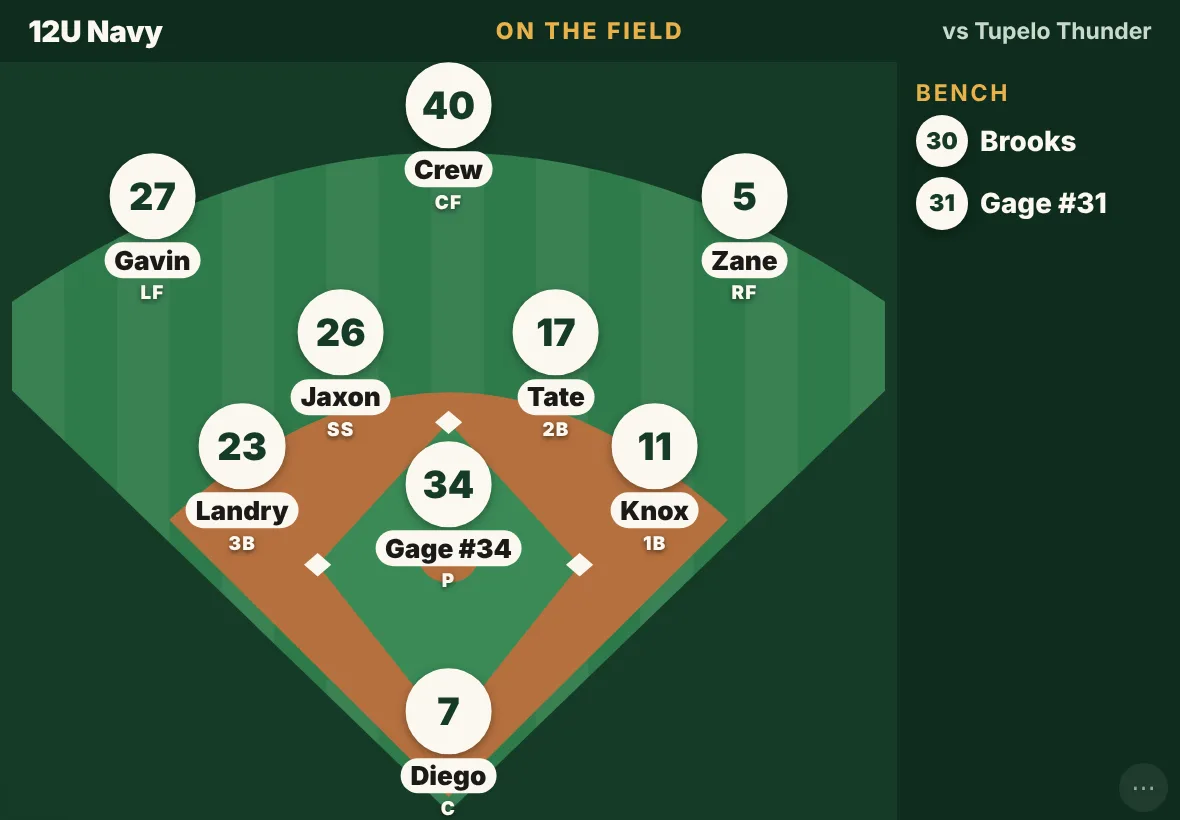
- Move players on your phone and a tablet or TV in the dugout shows the change right away. During the game it’s two big buttons: Swap the Bench In (a fair swap in one tap) and Next Batter. Save the lineups you use most. Lineup cards print for the umpire.
- Plays and situations
- Pick what happened, where it went and who’s on base, and the play comes up on a field: watch it step by step, and tap any position to see that player’s job. 49 situations built in (cutoffs, relays, backups, double plays, bunts), on your phone in the dugout too. Draw your own and share them with families.
- Practice plans
- A drill library, practice plans for your team with plays to walk through, and a practice clock that runs the stations.
- Player Binder
- Birth certificates and insurance cards on your phone at the tournament table, or one QR code the tournament director scans to see every player, number, birthday and “age verified.”
- Schedule and weather
- Paste your GameChanger schedule link once; changes flow in on their own, with the forecast for every field. Tournament schedule only on a website? Snap a screenshot and Blue adds your games.
- Team chat
- Announcements that reach every family’s phone, without a separate group-text app. Anyone can ask “@Blue what time is our game?” and Blue answers the chat. Every family gets a game-day alert at 6 AM with times, fields and weather.
- On your phone
- Schedules, documents and dues in your pocket at the field, with alerts. Add it to your home screen today; the iPhone and Android app is on the way.
For families
One page for everything about their player.
- What needs them
- The family page opens on a short list: pick a payment plan, add the birth certificate, book the hotel. When it’s done, it says “You’re All Set.”
- What’s coming up
- Games and practices with the weather, on their phone’s calendar too.
- What they owe
- Balance, payment plan and a pay button, plus what the whole season really costs before they say yes.
- Locker Room
- Each child’s birth certificate, insurance card, medical release, sizes and gear in one place. Snap each document once.
- Gear Locker
- Register gloves, bats and helmets with photos and the bat’s serial number. Lost at the fields? Report it to the team in one tap, and whoever finds it taps “I Found It.”
- Alerts
- Rainouts and time changes the moment they happen, as a notification on their phone.
- Travel
- The team hotel with one tap to book, and a quick “we’ve booked” so nobody has to ask.
- Plays to study
- The plays your coach shares, on the family page: kids watch where they go and tap their position to see their job.
- En español
- Tryout sign-up, team invitations and the family page switch to Spanish with one tap, and Blue answers in Spanish.
Meet Blue. Ask it, approve it, done.
Named for the umpire. Ask a question in plain words and Blue looks it up, only from what you’re allowed to see. Ask Blue to do something, like set a team’s dues, add a player, open tryouts or remind the families who are behind, and it lays out exactly what it will do. Nothing changes until you tap Approve. Blue helps; you make the call.
Blue answers the phone, too. Call (888) 304-7275 from the phone on your account, type your Phone PIN, and ask “What do I owe?” or “Who hasn’t turned in a birth certificate?” Parents can even pay with their saved card. Press 1 to confirm. Blue speaks Spanish, too.
New to BallparkOS? Tap Set Up With Blue and answer a few questions: your teams, dues, coaches and first tryout get set up as you go. Lost on a page? Ask Blue “show me how” and it lights up each button.
Set 12U dues to $1,800, first payment Dec 1, last one April 1.
Ready: $1,800 for each of 12 players, due Dec 1 to Apr 1. Families pick pay in full or monthly. Tap Approve and it’s done.
Now remind the families who are behind.
Here’s a reminder to the 3 families who are past due. Approve to send it.
Works With What You Already Use
Keep the tools your families know. BallparkOS fills in everything around them.
- GameChanger schedules
- Stripe for card and bank payments
- Your bank account
- iPhone, Google and Outlook calendars
- Excel and CSV roster imports
- Your own web address
- Facebook, Instagram, TikTok and YouTube on your website
- National Weather Service forecasts
Coming soon: iPhone and Android app · Text message alerts · QuickBooks Online
2 clubs have set up their season on BallparkOS since launch.
- Mississippi Vipers
- Rankin County Royals
Three Plans. No Per-Player Fees.
Your plan follows how many teams you run. Every plan includes every feature and AI, and families, coaches and board members never pay. BallparkOS never takes a cut of your dues.
Black Friday: 50% off your first year on every yearly plan, taken off automatically at checkout. No code needed. Ends Monday, Nov 30 at midnight (Central).
- TeamFor a single team1 team$390/yearAbout $32.50 a monthBlack Friday: first year
$290$145Everything, AI included - Recommended for ClubsSmall Club2–5 teams$990/yearAbout $82.50 a monthBlack Friday: first year
$990$495Everything, AI included - Club6+ teams$1,790/yearAbout $149.17 a monthBlack Friday: first year
$1,790$895Everything, AI included
| Team | Small Club | Club | |
|---|---|---|---|
| Teams | 1 team | 2–5 teams | 6+ teams |
| Price | $390/year | $990/year | $1,790/year |
| First year | $145/year (Black Friday) | $495/year (Black Friday) | $895/year (Black Friday) |
| Tryouts and roster offers | ✓ | ✓ | ✓ |
| Dues, payment plans and autopay | ✓ | ✓ | ✓ |
| Player Binder and age checks | ✓ | ✓ | ✓ |
| Board Room and Books | ✓ | ✓ | ✓ |
| Team chat, calendar and Dugout | ✓ | ✓ | ✓ |
| Blue, the AI helper | ✓ | ✓ | ✓ |
| Phone alerts for families | ✓ | ✓ | ✓ |
- Tryouts and roster offers
- Dues, payment plans and autopay
- Player Binder and age checks
- Board Room and Books
- Team chat, calendar and Dugout
- Blue, the AI helper
- Phone alerts for families
Every plan includes every feature. The only difference is how many teams you run, and your plan moves to the right size on its own when you add or remove a team.
One flat price for the whole club. It replaces the registration app, the scheduling app, the group-text app and the year-end scramble for your accountant, and it never takes a cut of a dues payment.
Comparing tools? See BallparkOS vs TeamSnap, Jersey Watch or SportsEngine.
From Clubs Using BallparkOS
“Signed up for spring in about three minutes. Easy!”
“One stop shop for everything.”
Why BallparkOS Exists
BallparkOS was built by a travel baseball dad who helps run a club and got tired of keeping up with everything: the group texts, the Venmo reminders, the binder of birth certificates, and checking a different app for every job.
So he built one place for all of it, and ran his own club on it first. Every part of it is made for the volunteers doing this on nights and weekends.
Questions Clubs Ask
Getting Started
What is BallparkOS?
BallparkOS is one place to run a travel baseball or softball club. Tryouts and registration, rosters and age checks, dues and payments, birth certificates and forms, schedules, team chat, game-day lineups, practice plans, sponsors, your books and board records, and even your club’s website all work together, so nothing has to be typed twice or tracked in a separate app. Built-in AI handles routine office work, like a daily to-do list and first drafts of paperwork, and people make every decision.
Who is it for?
Travel baseball and softball clubs of any size, from a single team to a club with dozens, and the volunteers who run them: directors, treasurers, coaches and team managers. Parents get their own simple page for their child’s schedule, balance, forms and team chat.
Does it work for softball?
Yes. It’s built for baseball and softball clubs alike, including softball’s own age rules (Grand Slam and USSSA).
What happens after the free trial?
You get 14 days with everything included. Choose a plan any time; nothing is charged until the trial ends. If you don’t choose one, your information stays saved until you do.
Can we bring our roster from a spreadsheet or Baseline?
Yes. Upload an Excel or CSV export, check the columns, and your players, parents and teams are in. Siblings are grouped into families, and anyone already in BallparkOS isn’t added twice.
How long does setup take?
Most clubs are running in an evening: import the roster, set dues for each team, invite your coaches, and drop each team’s join link in the group text so parents can sign in. A setup checklist on your home page walks you through each step.
Can you help us get set up?
Yes. Email us any time. If you’d like hands-on help, your club’s owner can turn on Support Access for 1, 7 or 30 days so we can set things up with you. You see everything we do, and we can’t touch money, documents or medical records. Help and contact.
What about tournament schedules?
Snap a screenshot or upload the PDF of a tournament’s schedule or bracket, and Blue picks out your team’s games for the coach to check and add. Every family then gets a game-day alert that morning with times, fields and the weather.
Does it work with GameChanger?
Yes. Paste each team’s GameChanger schedule link once and games flow onto your calendar, with changes kept up to date on their own. Families still use GameChanger for scores and streaming.
Families and Coaches
Do families pay to use it?
No. Your club pays for BallparkOS. Parents, coaches and board members are free.
Do parents have to download an app?
No. BallparkOS works in any phone or computer browser. Parents can add it to their home screen to get phone alerts for messages, schedule changes and payments.
How do parents get in?
You don’t need anyone’s email. Each team has a join link and QR code: paste it in your team’s group text, each parent makes a free account and taps their child, and the coach taps Approve (or lets it approve on its own). If you do have emails, send every parent an invite from the Families page with one tap. Either way, parents see only their own child’s team, schedule, balance and forms.
How do we collect birth certificates and insurance cards?
Right after a family accepts a team spot, they see one spot for each document and snap a photo (any phone photo or a PDF). Families who skip it get reminders, and the office can remind everyone missing one with a single button. Documents are encrypted and only your owners, admins and the player’s coaches can open them.
Can we show our Facebook, Instagram or TikTok?
Yes. Your club website can show your latest Facebook posts, TikTok videos, Instagram posts you pick and a YouTube video. Each team can link its own Facebook page, and when a coach goes live, one tap tells every family with the link.
Can we stop using GroupMe?
Most clubs do. Every team gets its own chat, there’s a chat for coaches and staff, and announcements show who has seen them, with a reminder to those who haven’t. Anyone can ask “@Blue what time is our game?” and Blue answers the whole chat from the team’s schedule. Players don’t have chat accounts.
Does it work in Spanish?
Yes. Family pages, like tryout sign-up, team invitations and the family page, switch to Spanish with one tap, and Blue answers in Spanish on the website, in team chat, by text and on the phone. Your club’s own waivers and contracts stay exactly as you wrote them.
Can families and coaches call for help?
Yes. Call (888) 304-7275 from the phone on your BallparkOS account and type the Phone PIN you set under My Account. Blue can tell a parent what they owe or whether a payment went through, take a payment with the saved card after they press 1, and tell a coach who hasn’t turned in a birth certificate. Blue only shares what you could see on the website, and never children’s birthdays, medical information or documents. Texting the same number is coming soon.
Does it help teach game situations?
Yes. Under Practice → Plays, pick what happened (ground ball, base hit, extra-base hit, fly ball or bunt), where it went and who’s on base, and the play comes up on a field with a job for all nine positions: who fields it, who’s the cutoff, who covers, who backs up. Tap a position to light that player up. 49 situations are built in, all following one cutoff and relay system, and coaches can copy and change any of them, draw their own, add them to a practice plan, open them from the dugout during a game, and share them with families so kids can study at home.
What if a player’s gear goes missing?
Families register gloves, bats, helmets and more in the Gear Locker, with photos and the bat’s serial number. Tap Report Lost and it goes to the team chat with a photo and a link; whoever finds it taps “I Found It” and the family gets an alert. It can also go on the public Lost & Found page for other clubs at the same fields. Names and phone numbers are never shown.
Our club is splitting. Do we have to start over?
No. An owner or admin can send a team or chosen players to another club, with the records you pick (documents, medical, sizes, chat history and more). The new club accepts, and each family says yes before their child’s records move. Money stays with the old club. Moving a player between teams in your own club takes two taps.
What can coaches see?
Their own teams: roster, schedule, lineups, practice plans, plays and team chat. Your club decides whether coaches can see parent contact information, medical information and player documents, using simple on and off switches.
Money
Where does dues money go?
Straight to your club’s own Stripe account. BallparkOS never holds your money and takes no cut of payments. Families can pay by card or bank transfer, and the processing fee can be added to their payment.
Can families pay in installments?
Yes. Families choose a payment plan, can turn on autopay with a saved card or bank account, and get reminders before each payment. Sibling discounts, discount codes and scholarships are built in.
Does it help with our books?
Yes. Payments, sponsorships and fundraising are recorded for you, coaches turn in receipts from their phones, and you can connect your bank or upload a statement to sort every charge. Reports and a year-end export are ready for your accountant.
Which plan do we need?
Team is for a single team, and new teams pay $29 a month for their first year. Small Club covers 2 to 5 teams, and Club covers 6 or more, with no limit. Add or remove a team and your plan moves to the right size on its own.
Do you have a referral program?
Yes: give a month, get a month. Every club has a referral link under Plan & Billing. A club that signs up through it gets an extra free month to try BallparkOS, and when it makes its first payment, your club gets a month free.
Can we cancel? What about refunds?
Cancel any time from Plan & Billing. There’s no contract; your plan stays on until the end of the month or year you’ve paid for, and your information stays saved. If BallparkOS isn’t right for your club, email us within 30 days of your first payment, monthly or yearly, and we’ll refund it in full.
Safety and Your Information
Is our players’ information safe?
Each person only sees what their role allows. Birth certificates and insurance cards are encrypted, and every time one is opened it’s logged. Children don’t have accounts. How we protect your players’ information.
Does AI make decisions about our players?
No. The AI helps with paperwork: it answers questions about your club, drafts board minutes and contracts, writes your daily to-do summary, and does club work you ask for, like setting dues or sending invitations, only after you approve it. It uses your numbers and choices, never its own. Roster, age and money decisions are always made by a person.
Who owns our club’s information?
Your club does. We never sell it or use it for advertising. You can download your books any time, and we’ll export or delete the rest of your club’s information whenever you ask. Privacy Policy.